TerraWeek -7 days challenge -Day 2:

Familiarize yourself with the HCL syntax used in Terraform
HCL Blocks: In Terraform, HCL stands for HashiCorp Configuration Language. HCL blocks are sections in your Terraform configuration where you define resources or configurations.HCL Blocks are like containers for your instructions in Terraform. Common HCL blocks include resource, variable, and module.

In this code, the resource block contains instructions to create an AWS EC2 instance.
Parameters: Parameters are like settings or options within HCL blocks. They allow you to customize how resources are created. For instance, in the above example, ami and instance_type are parameters
Arguments: Arguments are the actual values you provide to parameters. They are like the data that makes your resources unique. In the example,
"ami-053b0d53c279acc90"     Argument 1
"t2.micro"                  Argument 2
Now, let's talk about different types of resources and data sources in Terraform:
Resources: Resources are the things you want to create and manage with Terraform. They represent real infrastructure components like virtual machines, databases, or network configurations. You define these resources using the resource block in your Terraform configuration.
Another example for a resource block is:
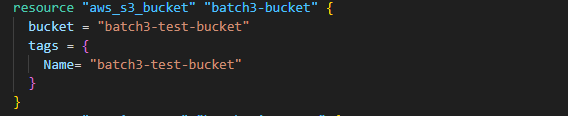
Data Sources: Data Sources allow Terraform to fetch information about existing infrastructure, like an existing AWS VPC. Here's an example:
data "aws_vpc" "example_vpc" {
  default = true
}
In this code, we're using a data source to fetch information about the default VPC in AWS.
Understand variables, data types, and expressions in HCL
Variables: Variables in HCL allow you to store and reuse values or data throughout your Terraform configuration.
variable "instance_type" {
 default = "t2.micro"
}
Here we've created a variable called instance_type with a default value of "t2.micro".
Data Types: Data types in HCL define the kind of information a variable can hold. The most common data types are string, number, bool (boolean), list, and map.
List Datatype: An ordered collection of values, enclosed in square brackets []
variable "fruits" {
  type    = list(string)
  default = ["apple", "banana", "cherry"]
}
In this code, we have a variable called fruits that can hold a list of strings.
Boolean Datatype: Represents true or false
variable "enabled" {
    type    = bool
    default = true
}
String Datatype: A sequence of characters, represented using double quotes.
variable "message" {
    type    = string
    default = "Hello, World!"
}
Map Datatype: A collection of key-value pairs, enclosed in curly braces {}
variable "person" {
 type = map(string)
 default = {name = "John", age = "30"}
}
Expressions: Expressions in HCL are used to manipulate or combine variables and values. They are like operations you perform on data.
resource "aws_instance" "my_instance" {
  ami = "ami-12345678"
  instance_type = var.instance_type
}
In this example we're using an expression (var.instance_type) to set the instance_type for an AWS EC2 instance. It takes the value from our instance_type variable.
Practice writing Terraform configurations using HCL syntax
#terraform block to tells to install specific provider
terraform {
  required_providers {
    docker = {
      source = "kreuzwerker/docker"
      version = "3.0.2"
    }
    aws = {
      source = "hashicorp/aws"
      version = "5.9.0"
    }
  }
}
provider "docker" {}
# resource block for docker to get image
resource "docker_image" "new_nginx_image" {
    name = "nginx"
    keep_locally = false

}
# reource block for docker to run container
resource "docker_container" "new_nginx_container" {
    image = docker_image.new_nginx_image.name
    name = "nginx_container"
    ports {
        internal = 80
        external = 80
    }

}
Useful Terraform Commands:
  • terraform plan: Command to preview changes before applying them.
  • terraform apply: Command to apply changes to deploy infrastructure.
  • terraform destroy: Command to destroy resources created by the terraform.
  • terraform state: Command to view the current state of your infrastructure.
  • terraform validate: Command to check your configuration file for syntax errors.
  • terraform fmt: Command to format your configuration file.
Conclusion:
In conclusion, understanding HCL configuration in Terraform is essential for creating and managing infrastructure as a code. By learning the basic HCL syntax, using variables, and incorporating data types, you can write modular and reusable Terraform Configurations.
Happy Reading!

